
Timelapse feature, and streaming on Android Wear!
I’ve started the integration of one of the most important feature missing in Printoid: the timelapses management!
With this release, you will be able to show all your rendered timelapses (new icon in the menu), to download and play one of your timelapse, and to delete them.
- Please note that Printoid will NOT play the timelapses video by itself for the moment. The Android video player will be called by default, or any other video player if installed (of course you will be able to choose your favorite one). I advice you to install VLC on your device, this is the best compromise to read all the different formats (even if OctoPrint generates your timelapses in MPG files)
- I will also integrate in the next release the possibility to configure the timelapse (enable/disable, change the type, fps, etc). Be patient, this will come really soon 🙂
- Please also note that the “help” button has moved from the menu: now you can retrieve it at the bottom of the settings screen.
I’ve also integrated the video streaming view in the Android Wear module! For the moment the video has a resolution of 400*400 px (this is sufficient on a wear device) and up to 2 FPS (in order to preserve the battery consumption)
🎆 Changelog
✂ Integration of the timelapse screen! Download/delete your rendered timelapses (timelapse configuration will come in the next release)
🎥 Streaming view now available on Wear module!
🔧 Simplification of the syntax of batches of custom GCODE commands
🔧 Fix inversion of feedrate & flowrate features
🔧 Fix first custom command added not showing
🔧 Enhance backup & restore feature
 (The streaming on Printoid Wear)
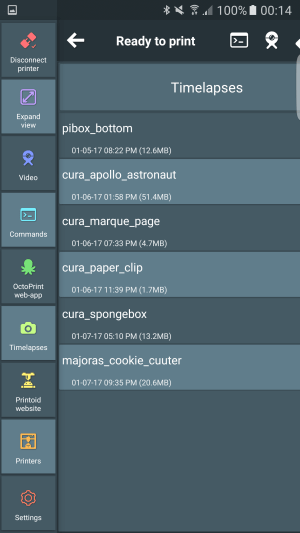 (The new “timelapses” option in the menu)
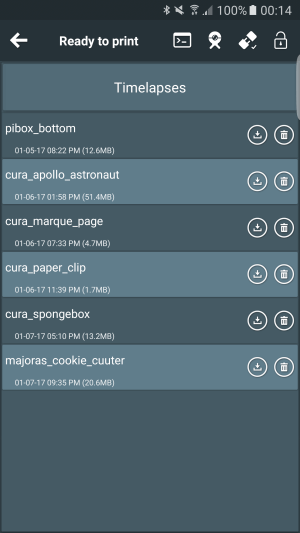 (The new “Timelapses” panel)
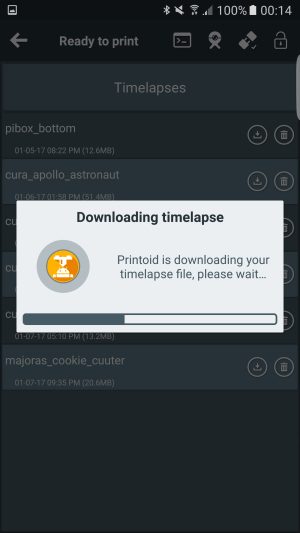 (Printoid can download and play your timelapses on your phone!)
 Printoid for OctoPrint